
Never Miss a Lead: Set Up Form Submission Notifications in Landing-Page.io
Learn how to set up form submission notifications on Landing-Page.io so you never miss a lead. Get real-time email alerts every time a visitor submits your landing page form.
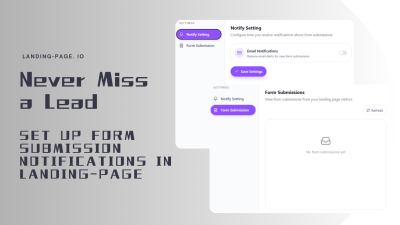
Every form submission on your landing page is a potential customer reaching out. But without form submission notifications, those leads can sit unnoticed for hours—or worse, forever. If you have ever wondered how to get notified when someone submits a form, this guide walks you through setting up real-time alerts on Landing-Page.io.
Why You Need Form Submission Notifications
When a visitor fills out your landing page form and hits submit, the clock starts ticking. Studies show that responding to a lead within the first five minutes increases the chance of conversion by up to 400%. Without form submission email alerts, you are essentially leaving money on the table.
Here is what happens without notifications:
- Delayed response times — You only discover new leads when you manually check your dashboard.
- Lost opportunities — Hot leads go cold while waiting for a reply.
- No visibility — You have no way of knowing how many people are trying to reach you in real time.
Landing-Page form submission alerts solve this by delivering instant email notifications the moment someone submits a form on your published landing page.
How to Set Up Form Submission Notifications
Setting up form submission alert settings on Landing-Page.io takes less than a minute. Here is the step-by-step process:
Step 1: Open Your Landing Page Settings
Navigate to your landing page project and click the Settings button in the top-right corner of the editor.
Step 2: Go to Notify Setting
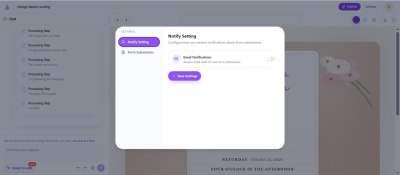
In the Settings panel, select Notify Setting from the left sidebar. This is where you configure how you receive notifications about form submissions.
Step 3: Enable Email Notifications
Toggle the Email Notifications switch to the ON position. When enabled, you will receive email alerts for every new form submission on this landing page.
Step 4: Save Your Settings
Click the Save Settings button to apply your changes. That is it — you are now set up to track form submissions with email alerts.
What Happens After You Enable Notifications
Once form submission notifications are active, here is what you can expect:
- Instant email alerts — Every time a visitor submits your form, you receive an email with the submission details.
- Lead details included — The notification includes the visitor's name, email, message, and any other fields they filled out.
- No setup required — The feature works out of the box with any form on your Landing-Page.io landing pages.
This means you can respond to inquiries immediately, turning casual visitors into paying customers.
Real-Time Form Submission Alerts for Better Conversions
Real-time form submission alerts are not just about convenience—they directly impact your bottom line. When you know the moment someone reaches out, you can:
- Respond faster — Beat your competitors by being the first to reply.
- Prioritize hot leads — Identify urgent inquiries and handle them first.
- Track form submissions with email — Keep a running record of all submissions in your inbox for easy follow-up.
For businesses that rely on landing pages for lead generation, Landing-Page form notifications are an essential tool for maximizing ROI.
Best Practices for Form Submission Notifications
To get the most out of your landing page lead notification feature, consider these tips:
- Use a dedicated email — Set up notifications to go to a team inbox so multiple people can respond quickly.
- Check your spam folder — Make sure notification emails are not being filtered. Add the sender to your safe list.
- Combine with a CRM — Forward notification emails to your CRM to keep your sales pipeline organized.
- Set response time goals — Aim to respond within 5 minutes during business hours.
- Monitor submission patterns — Use the timing of submissions to optimize your ad spend and landing page schedule.
Frequently Asked Questions
How do I get notified when someone submits a form on my landing page?
Enable Email Notifications in your Landing-Page.io Settings panel under Notify Setting. Once toggled on, you will receive an instant email alert for every form submission.
Are form submission notifications free?
Yes, form submission notifications are included with your Landing-Page.io account at no additional cost.
Can I receive notifications for multiple landing pages?
Yes, you can enable form submission alerts independently for each of your landing pages. Simply open the Settings panel for each page and enable Email Notifications.
What information is included in the notification email?
The notification email includes all the fields the visitor filled out in the form, such as name, email address, phone number, and message.
How fast are form submission email alerts delivered?
Landing-Page form submission alerts are delivered in real time. You should receive the email within seconds of a visitor submitting the form.
Never Miss Another Lead
Form submission notifications are a simple but powerful feature that ensures you never miss a lead. By setting up real-time email alerts on Landing-Page.io, you can respond to inquiries faster, convert more visitors, and get the most out of your landing pages.
Ready to start capturing every lead? Create your landing page with Landing-Page.io today and enable form submission notifications in your settings.
Ready to Create Your Landing Page?
Apply these insights and build high-converting landing pages in minutes with our AI-powered builder.